Table of Contents
- Why Use Multiple Browsers?
- Setting Up Browser Workspaces
- Organizing Tabs and Windows
- Leveraging Browser Extensions
- Syncing and Bookmarking
- Maintaining Privacy and Security
- Monitoring and Limiting Distractions
- Conclusion
Maximizing productivity in a digital world requires intentional strategies for managing the variety of tools used throughout the day. For many, using multiple web browsers is an effective way to address task overload, streamline digital workflows, and maintain clear boundaries between work and personal activities. Learning how to manage multiple browsers efficiently can make a real difference in focus and task management. Follow Shift browser updates to stay up to date with new productivity solutions and tips designed for modern professionals.
By compartmentalizing digital tasks and leveraging browser features, individuals can reduce distractions and better organize their workload. This separation of virtual environments helps prevent the mental fatigue caused by cluttered browser windows and unorganized tabs, allowing users to transition seamlessly from one project to another. Whether you’re toggling between remote work and personal life, handling multiple freelance clients, or just organizing online research and communication, the right browser strategy matters.
Pairing browser management strategies with purpose-driven extensions creates a flexible, customizable system. For instance, setting up unique browser profiles for client work, personal finance, and entertainment lets you isolate cookies and extensions, which can improve privacy and speed up access to the resources you need for each digital role. These habits boost efficiency by making each online environment easily recognizable and tailored to a specific type of work.
Why Use Multiple Browsers?
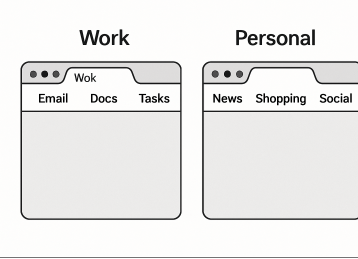
Adopting multiple browsers helps users separate work and personal tasks, reducing mental clutter and fostering a focused mindset. For example, one browser can be dedicated exclusively to work emails and remote collaboration platforms, while another is used solely for personal browsing, news, or streaming. This division creates a digital “workspace” that mirrors having dedicated desks or rooms for different tasks, ensuring boundaries are maintained and distractions are minimized.
Splitting tasks between browsers is also useful for maintaining different login sessions, such as being signed into multiple Google accounts simultaneously—one for work and another for personal matters—which can be particularly handy for freelancers, consultants, or anyone juggling side hustles alongside a primary job. By maintaining these boundaries, users can concentrate better, reduce the temptation to multitask in unproductive ways, and ultimately accomplish more.
Setting Up Browser Workspaces
Most modern browsers offer tools to create custom “workspaces.” Google Chrome and Microsoft Edge let users add separate profiles, each maintaining its own set of bookmarks, extensions, and saved logins. Firefox and Brave allow multiple user profiles and private windows, which can be named for added clarity. This is useful for separating tasks such as project management, online banking, and research, making it easier to switch contexts quickly without confusion.
Workspaces aren’t just about different browsers—they’re about thoughtfully grouping tabs and resources based on their purpose. Organizing profiles for specific clients or teams helps ensure relevant documents and links are always a click away.
Organizing Tabs and Windows
Open tabs can quickly spiral out of control, draining system memory and scattering your focus. Saving tab sessions makes it easy to reopen later, minimizing the risk of accidentally closing necessary research or project resources. Another effective tactic is naming browser windows based on current projects or workflows. For example, labeling one window “Q2 Marketing Campaign” and another “Client Invoices” can make it easy to find and switch between active projects. This reduces navigation time and cognitive fatigue as you move through your daily digital tasks.
Leveraging Browser Extensions
Browser extensions can supercharge productivity by automating repetitive tasks, helping manage to-do lists, and customizing browsing environments. Extensions offer advanced tab and workspace management, while Momentum replaces empty tabs with inspirational quotes and personalized task lists to keep motivation high. Task-specific password management extensions are essential for anyone looking to make the most of their online time. Carefully select extensions that enhance, not distract from, your core goals. Unnecessary or outdated add-ons can slow down browsers and introduce security risks, so it’s wise to conduct regular audits and keep only tools that add real value to your workflow.
Shift browser updates Syncing and Bookmarking
Seamless workflow is best achieved when bookmarks, history, passwords, and browser settings are synchronized across devices. This ensures that essential resources and saved passwords are always at hand, regardless of which device you’re using. Effective bookmarking also plays a critical role in quick navigation. According to Wired, organizing browser tabs and bookmarks into themed folders can streamline access to frequently used resources and reduce time wasted searching or re-Googling. Implementing bookmarks bars, saving priority sites for one-click access, and frequently updating your folders keeps your digital navigation optimized.
Maintaining Privacy and Security
Utilizing multiple browsers can enhance security and protect user privacy. For instance, dedicating a browser to sensitive tasks like banking or confidential work communication reduces the scope of potential threats, keeping cookies, trackers, and active sessions separate from your general browsing environment. Regularly updating your browser and reviewing your extension permissions are basic but vital steps to protect against newly discovered vulnerabilities or exploits. Enabling features such as two-factor authentication (2FA) and choosing privacy-first browsers with strong anti-tracking technology can further bolster online security.
Monitoring and Limiting Distractions
Maintaining focus while online is a challenge best met with proactive tools. Additionally, establishing rules for checking notifications or social feeds—such as limiting email review to set intervals—helps break the cycle of constant interruptions. This intentional structure safeguards deep work periods, making it easier to achieve both work and personal goals without the pull of endless digital distractions. For more information visit my website
Shift browser updates Conclusion
Mastering the management of multiple browsers isn’t just about digital minimalism—it’s about intentionally structuring your online activities for clarity, security, and sustained productivity. By thoughtfully compartmentalizing tasks, leveraging browser-specific tools and extensions, and staying vigilant about privacy and distractions, professionals can optimize their digital environments and better achieve their objectives in an ever-connected world.